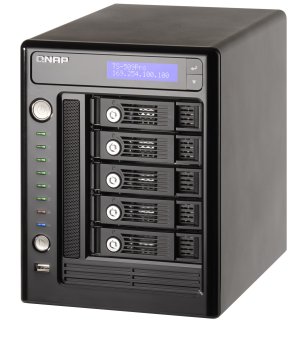
Modern business requires a centralized data center to protect information asset, back up critical data, share the information among workgroups or departments. A solid, efficient, and flexible data backup system is the key to greater business agility and also an increasingly important task for IT administrator. QNAP TS-509 Pro Turbo NAS is the new generation all-in-one NAS server for SMB and enterprises. It offers the most reliable and powerful storage solution. With superior performance, versatile server features, best-in-class RAID data protection, and rock-solid hot swappable hard drive design, the TS-509 Pro brings business nowadays a truly new experience of instant data access and sharing, a protected mass storage, value-plus server features at the lowest maintenance cost.
Powered by Intel Celeron 1.6GHz CPU, 1GB DDRII memory, the 5-bay, hot-swappable TS-509 Pro delivers superior performance for multiple business applications and intensive concurrent data access. The Linux OS and applications of the TS-509 Pro are embedded in the flash DOM that higher stability is guaranteed. Moreover, the dual Gigabit LAN ports can be configured as Failover, Load balancing, or serving two different subnets which enables more deployment options in a business network environment.
Advanced RAID redundancy with expandability and upgradeability
Advanced RAID configurations, RAID 0/ 1/ 5/ 6/ 5+Spare and JBOD are all supported. With Online RAID Capacity Expansion, users can select to purchase the most cost-effective hard drives for initial server setup and upgrade to larger ones in the future. With Online RAID Level Migration, users can start from one drive firstly and add more to upgrade the RAID level in the future with the data retained.
Easy setup, low-cost maintenance
The handy LCD display on the TS-509 Pro provides a speedy and easy approach for IT administrators to initialize the NAS and set up the RAID configuration without using any computer. The system information and settings are also displayed for easy management. The schedule power on/off feature is available on the TS-509 Pro for IT administrators to flexibly manage the NAS server's up time according to the working hours. Also, the smart Wake on LAN is supported for convenient remote wakeup of the NAS in the local network.

High Performance NAS for Business
Superior Performance
NetBench is a benchmark program that measures the performance of a file server in handling file I/O requests. It is a useful indicator of the performance of NAS device/ file server when it is simultaneously accessed by multiple users.

The test results show that TS-509 Pro delivers superior performance (over 300Mbps when serving 16 clients), under single disk configuration. The throughput of other NAS brands of the same level only reaches a half or less than that of QNAP TS-509 Pro. It reflects the TS-509 Pro's capability as the best file server solution in a business environment.
DOM Architecture with Embedded Fail-safe Dual OS
All the OS and applications are embedded on the DOM. The TS-509 Pro allows system booting without accessing the physical disk sectors and that prevents unsuccessful system startup caused by bad block sectors or file errors on the hard drives. Two operating systems are built on the DOM for system booting alternatively upon every system startup. When one fails, the other one will be used to boot up instead, and the failed OS is recoverable from the other healthy OS.
Advanced RAID Management with Hot-swap Design
The NAS offers advanced RAID 0, 1, 5, 6, 5 + Spare, Single, and JBOD disk configurations. It also supports hot-swap design that a failed drive can be replaced by hot swapping without turning off the server. Besides, the best-in-class RAID on the NAS brings users a higher level of data security by allowing one more hard drive failure than other NAS of the same level.
Online RAID Capacity Expansion
The storage capacity of a RAID configuration can be expanded by replacing the hard drives with larger ones. All the data will be kept and seamlessly moved to the newly installed hard drives. There is no need to turn off the server during the process.

|
|
Online RAID Level Migration
Users can upgrade the disk configuration to higher RAID level with the data retained. There is no need to turn off the server during the process.

|
|
Touch-N-Go PC-less Installation
You can use the handy LCD to finish the first time installation in 3 simple steps. The NAS will automatically complete the hard disk formatting and RAID building.
 Schedule Power on/ off Schedule Power on/ off
The flexible schedule power on/off feature is provided on the NAS for users to manage the NAS server's up time according to the working hours. You can set the time for automatic system power on, power off, or restart on any days of the week.
Wake on LAN
Enable this option to power on the NAS remotely by Wake on LAN. Wake on LAN helps you manage your NAS conveniently.
Dual Gigabit LAN Ports for More Deployment Options
Network Failover
Failover allows the NAS to sustain the failure of one network port to provide continuous services.
Load-Balancing
Bandwidth aggregation is supported to boost the file transfer speed (works with managed Ethernet switch with 802.3ad configured).
Multi-IP Setting

The NAS can be deployed with two different IP settings for sharing among different workgroups in two different subnets.
Complete Backup Solutions
QNAP Backup Software - NetBak Replicator
The backup software, NetBak Replicator, is provided for the NAS users to perform real-time synchronization or schedule backup from multiple PCs to the NAS.
3rd Party Backup Software Ready
The NAS works well with other backup software, e.g. Arconis True Image, CA BrightStor ARCserve Backup, EMC Retrospect, Symantec Backup Exec, and LaCie Silverkeeper.
Encrypted Remote Replication by Rsync
Data on the NAS can be backed up to or from another Turbo NAS or Rysnc server over the network securely.
One Touch USB Auto Copy
The one touch button can be configured to trigger instant data backup from the external USB device to the NAS or the other way round (applies to the USB device connected to the front USB port of the NAS only).
 S.M.A.R.T & Advanced HDD Health Scanning (HHS) S.M.A.R.T & Advanced HDD Health Scanning (HHS)
The NAS supports Hard Disk Drive S.M.A.R.T (Self-Monitoring Analysis and Reporting Technology) for monitoring the hard drive status. Moreover, the NAS is embedded with HHS Technology which supports disk checking and bad blocks scanning.
 Comprehensive Event Logs Comprehensive Event Logs
Logs of connections to the NAS via samba, FTP, AFP, HTTP, HTTPS, Telnet, and SSH, and networking services accessed by online users are all recorded.
 Sharing files across Windows, Mac, Linux, and UNIX Sharing files across Windows, Mac, Linux, and UNIX
The NAS is specially designed for different users to share the files across Windows, Mac, Linux, and UNIX environment.
Support Windows AD
The Windows AD feature enables server manager to import user accounts from AD domain to NAS to reduce the time and effort for account setup, and users can use the same set of login name and password.
Secure Data Storage, Access, and Sharing
 IP filter control: Users can allow or deny specified IP connections to the NAS. IP filter control: Users can allow or deny specified IP connections to the NAS. - SSL Security (HTTPS): The NAS can be accessed and configured by web browser securely.
- Remote login your The NAS by SSH (secure shell) or Telnet connection.
- Secure FTP: Share and transmit your data over SSL/TLS (Explicit) encryption. Passive FTP port range setup is also supported.
- Smart FTP policy control: The maximum number of all FTP connections and a single account can be configured.
- Encrypted remote replication: Data on the NAS can be backed up to another QNAP NAS product over the Internet securely.
 Ease of User and Share Folder Management Ease of User and Share Folder Management
The NAS supports batch creation of users and share folders to save the time and effort of the server manager in account and folder creation. For the security of Windows network environment, server managers can hide or show network share folders.
 |
File Server
The NAS allows server manager to create user ID and password, and define the authority and quota for each user. |
 |
FTP Server
You can establish your own FTP server, manage the access authority of the FTP server, and share your files with others easily in a few steps. |
 |
Encrypted Remote Replication
Encrypted remote replication provides high level of data protection. Files can be backed up from the NAS to other QNAP NAS products in remote locations. |
 |
Web Server with Built-in phpMyAdmin
With the built-in phpMyAdmin, Joomla!, editable php.ini, MySQL and SQLite, you can easily set up your web server and other online applications such as online shops, forums, and blogs. |
 |
MySQL Server
The NAS is can be configured as a standalone database server for system integrators. It can be applied in various deployments such as a database server of another web server in remote site or an additional backup database server. |
 |
Printer Server
The NAS supports network printer sharing function (max 3 sets). |
UPS Support
The NAS supports both APC and MGE UPS devices which help users store the data in time and avoid critical data loss when power outage occurs during data transfer.
Network Recycle Bin
The files deleted from the network shares of the NAS will be moved to a particular recycle bin folder. You can restore your data anytime in case of unintended file deletion.
Software Expansion via QPKG Platform
The QPKG software package platform enables the users to maximize the usage of Turbo NAS by installing additional software packages developed from the users and community worldwide. This can be done by simple "download & install" clicking without going through any complicated process.
Call our Sales Team Now on
08450 666 222
For a free Consultation and to Purchase
|
|
All prices quoted on our website are subject to change without notice & exclude Delivery & VAT.
Please see our Terms and Conditions for more details.
All QNAP products are covered by free technical support direct from the manufacturer. However you can upgrade any QNAP product to include Gold Support, local technical support provided by SQS engineers in Reading , Berkshire , via our Technical@sqsonline.com service. Technical@sqsonline.com utilises the services of GoToMyPC. All onsite maintenance contracts include Gold Support for the duration of the onsite maintenance contract. SQS Ltd does not provide any direct technical support for any product that is not covered either by an onsite maintenance contract or by a Gold Support contract. All contracts must be valid and payment must have been made in full prior to any technical support request. Gold Support and onsite maintenance contracts are available to purchase only when making an initial hardware purchase. Service level upgrade to either onsite maintenance or Gold Support is not available after delivery.
For More Information
On Network Attached Storage (NAS)
Call Us On 08450 666 222 |